
Exporting Bookmarks

Step 1: Click 3 stacked dots in top right

Screenshot 2024-08-08 122148.png

Step 2: Click Bookmarks and Lists

Screenshot 2024-08-08 122207.png

Step 3: Click BookmarkOpen Managerbookmarks manager
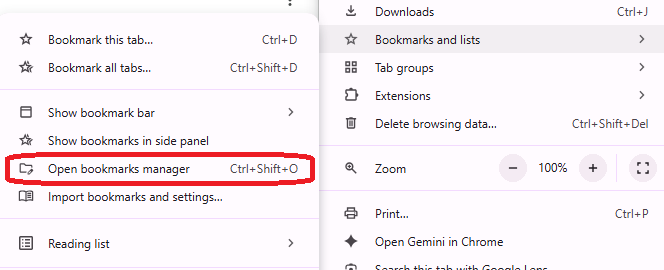
Screenshot 2024-08-08 122229.pngScreenshot 2026-11-10 084610.png

Step 4: Click 3 stacked dots in the top right but below the address bar

Screenshot 2024-08-08 124619.png

Step 5: Click Export Bookmarks

Screenshot 2024-08-08 122301.png

Step 6: Choose your file name and location to save to and Click Save